Tạo Hook
Nội dung Markdown đầy đủ của trang tài liệu.
# 🪝 Tạo Hook
## 🔐 Token là gì?
Token được tạo **một lần duy nhất** trong quá trình khai báo Hook trên hệ thống [Pay2S.vn](https://pay2s.vn). Token giúp xác minh rằng dữ liệu giao dịch được gửi từ Pay2S là **chính xác và hợp lệ**.
### Định dạng Request Header
```
Content-Type: application/json
Authorization: Bearer <SecretKey>
```
> **⚠️ Lưu ý**: Token này chỉ được hiển thị duy nhất một lần khi bạn tạo Hook. Lưu giữ an toàn!
---
## 🛠️ Cách tạo Webhook
### 1️⃣ Truy cập Webhooks
- Vào khu vực `Webhooks` → `Thêm webhook`
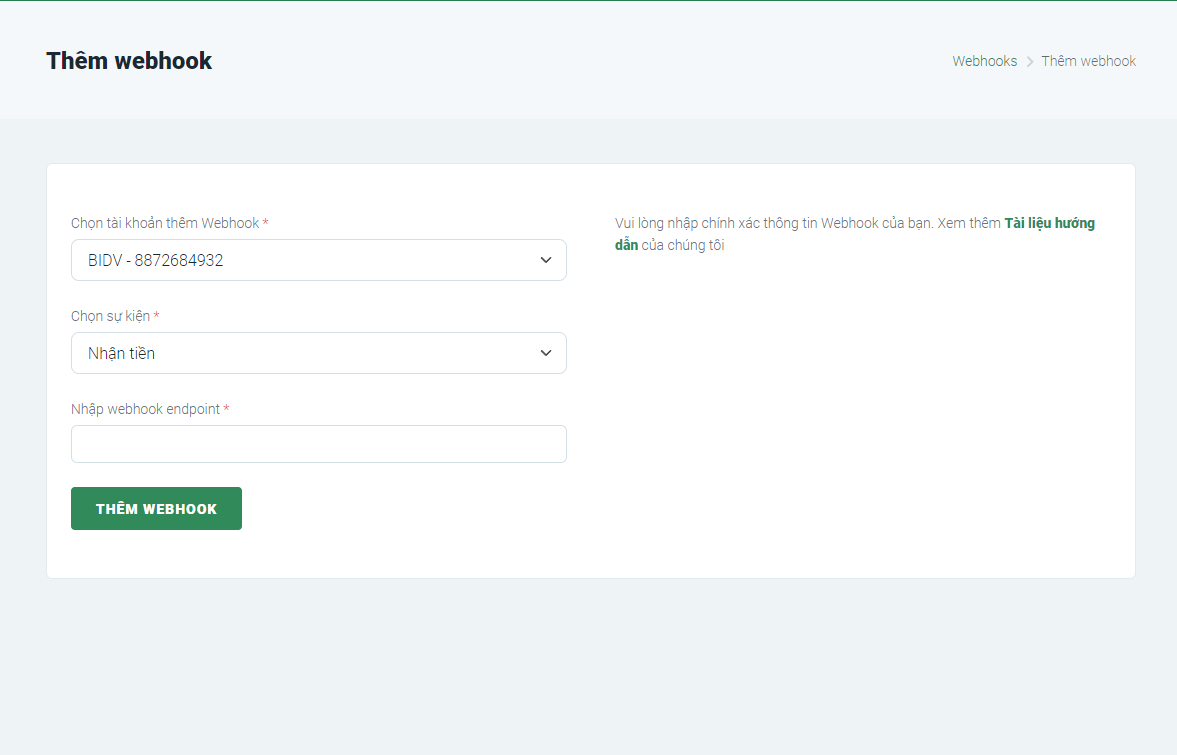
- Bạn sẽ thấy giao diện như sau:
### 2️⃣ Nhập các thông tin cần thiết
| Trường | Bắt buộc | Mô tả |
|--------|---------|-------|
| Tài khoản | ✓ | Tài khoản liên kết sẽ gửi dữ liệu |
| Sự kiện | ✓ | Loại giao dịch (tất cả, nhận, chuyển) |
| Endpoint | ✓ | URL nhận dữ liệu (http/https) |
### 3️⃣ Mô tả chi tiết
#### **Chọn tài khoản**
- Chọn tài khoản ngân hàng đã liên kết
- **Lưu ý**: Bạn cần liên kết tài khoản trước khi tạo Hook
#### **Chọn sự kiện**
- **Tất cả**: Gửi cả giao dịch nhận và chuyển
- **Nhận tiền**: Chỉ gửi khi có tiền vào
- **Chuyển tiền**: Chỉ gửi khi có tiền ra
#### **Endpoint**
- URL địa chỉ nhận dữ liệu từ Pay2S
- Dùng `https://` nếu website có SSL
- Dùng `http://` nếu không có SSL
- Phải trả về HTTP 200 để xác nhận
---
## 🔁 Chu kỳ gửi dữ liệu
### ⏱️ Cơ chế Retry
- **Gửi ngay**: Ngay lập tức khi có giao dịch
- **Retry 1**: Sau 60 giây nếu chưa nhận được 200
- **Retry 2-5**: Tiếp tục retry 5 lần nếu lỗi
- **Dừng**: Khi nhận được HTTP 200 hoặc sau lần gửi thứ 6
### ✅ Điều kiện dừng
Pay2S sẽ ngừng gửi nếu:
1. Nhận được **HTTP 200** hoặc
2. Response body chứa:
```json
{
"success": true
}
```
---
## 💻 Ví dụ xử lý Webhook
::: code-group
```php [PHP]
<?php
// Lấy header Authorization
$headers = getallheaders();
$authHeader = $headers['Authorization'] ?? '';
// Kiểm tra token
$token = 'YOUR_SECRET_KEY_HERE';
if ($authHeader !== 'Bearer ' . $token) {
http_response_code(401);
echo json_encode(['success' => false]);
exit;
}
// Lấy dữ liệu JSON từ body
$data = json_decode(file_get_contents('php://input'), true);
// Xử lý dữ liệu giao dịch
$id = $data['id'];
$transactionNumber = $data['transactionNumber'];
$amount = $data['transferAmount'];
$content = $data['content'];
// Lưu vào database
// INSERT INTO transactions (id, transaction_number, amount, content) VALUES ($id, $transactionNumber, $amount, $content);
// Trả về response
http_response_code(200);
echo json_encode(['success' => true]);
?>
```
```javascript [Node.js]
const express = require('express');
const app = express();
app.use(express.json());
const SECRET_KEY = 'YOUR_SECRET_KEY_HERE';
app.post('/webhook', (req, res) => {
// Kiểm tra header Authorization
const authHeader = req.headers['authorization'] || '';
if (authHeader !== `Bearer ${SECRET_KEY}`) {
return res.status(401).json({ success: false });
}
// Lấy dữ liệu từ body
const { id, transactionNumber, transferAmount, content } = req.body;
// Xử lý dữ liệu giao dịch
console.log('Transaction received:', {
id,
transactionNumber,
transferAmount,
content
});
// Lưu vào database
// await Transaction.create({ id, transactionNumber, transferAmount, content });
// Trả về response
return res.status(200).json({ success: true });
});
app.listen(3000, () => console.log('Webhook server running on port 3000'));
```
```python [Python]
from flask import Flask, request, jsonify
import os
app = Flask(__name__)
SECRET_KEY = 'YOUR_SECRET_KEY_HERE'
@app.route('/webhook', methods=['POST'])
def webhook():
# Kiểm tra header Authorization
auth_header = request.headers.get('Authorization', '')
if auth_header != f'Bearer {SECRET_KEY}':
return jsonify({'success': False}), 401
# Lấy dữ liệu JSON
data = request.get_json()
transaction_id = data.get('id')
transaction_number = data.get('transactionNumber')
amount = data.get('transferAmount')
content = data.get('content')
# Xử lý dữ liệu giao dịch
print(f'Transaction: {transaction_id}, Amount: {amount}')
# Lưu vào database
# db.transaction.insert_one({ 'id': transaction_id, 'transaction_number': transaction_number, 'amount': amount, 'content': content })
return jsonify({'success': True}), 200
if __name__ == '__main__':
app.run(port=5000, debug=False)
```
```java [Java]
import org.springframework.web.bind.annotation.*;
import org.springframework.http.ResponseEntity;
import org.springframework.http.HttpStatus;
import com.google.gson.Gson;
import java.util.Map;
@RestController
@RequestMapping("/webhook")
public class WebhookController {
private static final String SECRET_KEY = "YOUR_SECRET_KEY_HERE";
@PostMapping
public ResponseEntity<?> handleWebhook(
@RequestHeader(value = "Authorization", required = false) String authHeader,
@RequestBody Map<String, Object> data) {
// Kiểm tra header Authorization
if (authHeader == null || !authHeader.equals("Bearer " + SECRET_KEY)) {
return ResponseEntity.status(HttpStatus.UNAUTHORIZED)
.body(Map.of("success", false));
}
// Lấy dữ liệu giao dịch
String id = (String) data.get("id");
String transactionNumber = (String) data.get("transactionNumber");
Long amount = ((Number) data.get("transferAmount")).longValue();
String content = (String) data.get("content");
// Xử lý dữ liệu
System.out.println("Transaction: " + id + ", Amount: " + amount);
// Lưu vào database
// transactionService.save(new Transaction(id, transactionNumber, amount, content));
return ResponseEntity.ok(Map.of("success", true));
}
}
```
```go [Go]
package main
import (
"encoding/json"
"log"
"net/http"
"strings"
)
const SECRET_KEY = "YOUR_SECRET_KEY_HERE"
type WebhookData struct {
ID string `json:"id"`
TransactionNumber string `json:"transactionNumber"`
TransferAmount int64 `json:"transferAmount"`
Content string `json:"content"`
}
func webhookHandler(w http.ResponseWriter, r *http.Request) {
// Kiểm tra Authorization header
authHeader := r.Header.Get("Authorization")
if authHeader != "Bearer "+SECRET_KEY {
w.WriteHeader(http.StatusUnauthorized)
json.NewEncoder(w).Encode(map[string]bool{"success": false})
return
}
// Đọc và parse JSON body
var data WebhookData
if err := json.NewDecoder(r.Body).Decode(&data); err != nil {
w.WriteHeader(http.StatusBadRequest)
json.NewEncoder(w).Encode(map[string]bool{"success": false})
return
}
// Xử lý dữ liệu giao dịch
log.Printf("Transaction received: %s, Amount: %d", data.ID, data.TransferAmount)
// Trả về response
w.Header().Set("Content-Type", "application/json")
w.WriteHeader(http.StatusOK)
json.NewEncoder(w).Encode(map[string]bool{"success": true})
}
func main() {
http.HandleFunc("/webhook", webhookHandler)
log.Println("Webhook server running on :8080")
http.ListenAndServe(":8080", nil)
}
```
```ruby [Ruby]
require 'sinatra'
require 'json'
SECRET_KEY = 'YOUR_SECRET_KEY_HERE'
post '/webhook' do
# Kiểm tra Authorization header
auth_header = request.headers['Authorization'] || ''
if auth_header != "Bearer #{SECRET_KEY}"
status 401
return { success: false }.to_json
end
# Lấy dữ liệu JSON
data = JSON.parse(request.body.read)
id = data['id']
transaction_number = data['transactionNumber']
amount = data['transferAmount']
content = data['content']
# Xử lý dữ liệu giao dịch
puts "Transaction received: #{id}, Amount: #{amount}"
# Lưu vào database
# Transaction.create(id: id, transaction_number: transaction_number, amount: amount, content: content)
status 200
{ success: true }.to_json
end
```
:::
---
## 📌 Test Webhook
### Cách test
1. **Tạo giao dịch test** trên hệ thống Pay2S
2. **Kiểm tra logs** endpoint của bạn để xem dữ liệu nhận được
3. **Xem lịch sử** tại mục **Lịch sử giao dịch** trên dashboard Pay2S
### Công cụ test
Dùng Postman hoặc curl để test:
```bash
curl -X POST https://your-endpoint.com/webhook \
-H "Authorization: Bearer YOUR_SECRET_KEY_HERE" \
-H "Content-Type: application/json" \
-d '{
"id": "test123",
"gateway": "momo",
"transactionDate": "2024-01-25",
"transactionNumber": "TXN001",
"accountNumber": "0123456789",
"content": "Test payment",
"transferType": "IN",
"transferAmount": 100000,
"checksum": "abc123"
}'
```
---
## ⚡ Best Practices
1. **Bảo mật**: Lưu token ở environment variables, không hardcode
2. **Validation**: Luôn kiểm tra Authorization header trước khi xử lý
3. **Idempotency**: Xử lý được webhook gửi nhiều lần (lưu transaction ID)
4. **Response nhanh**: Trả về 200 trong 30 giây, offload processing vào queue
5. **Logging**: Log tất cả webhook để debug và audit
6. **HTTPS**: Luôn dùng HTTPS cho endpoint
7. **Error handling**: Đừng trả về 200 nếu có lỗi database
8. **Monitoring**: Alert khi webhook failed hoặc timeout
9. **Database transaction**: Dùng transaction để tránh race condition
10. **Rate limiting**: Đừng bị dồn request từ Pay2S (nếu endpoint lỗi)